
Create a quiz
There are two ways to create a quiz:
- The quiz editor, in the Quizz tab of the manager interface. This is the recommended way: it validates your questions as you type and handles media uploads.
- JSON files, written by hand in the
config/quizzfolder. Useful to generate quizzes with a script or keep them under version control.
Both produce the same files, so you can mix them: create a quiz in the editor and tweak the JSON later, or the other way around.
With the editor
Section titled “With the editor”Open the manager interface, go to the Quizz tab and click Create Quizz. Give your quiz a subject, then add questions.
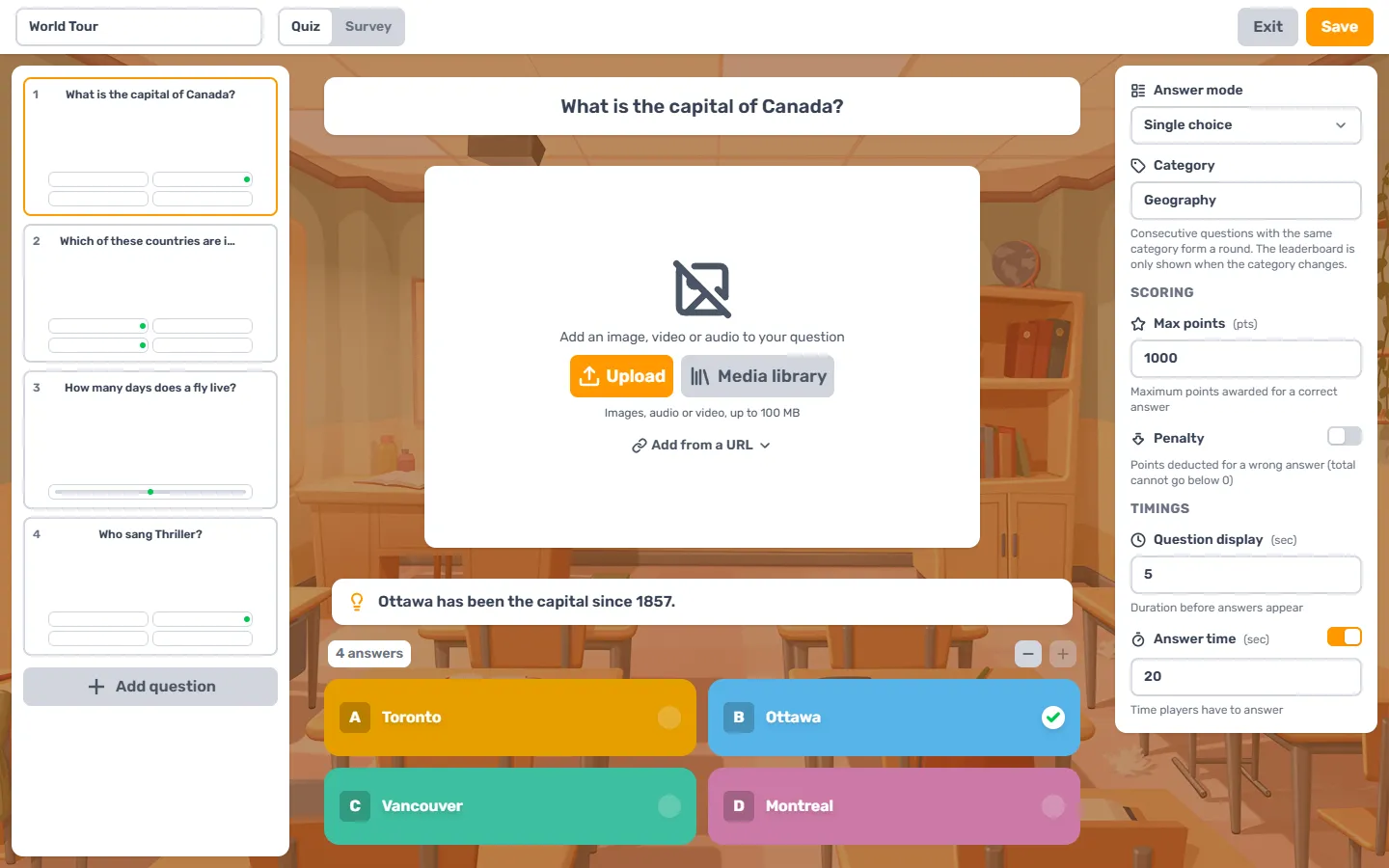
- On the left, the list of questions. Drag them to reorder, and add new ones.
- In the middle, the question as players see it: its text, its media, an optional explanation, and the answers. Click the circle of an answer to mark it as right.
- On the right, the settings of the question: its type, its category, its points and its timings.
Click Save when you are done.
From the same tab, you can also:
- Export a quiz as JSON, to back it up or share it.
- Import a quiz from JSON, for example a quiz shared by someone else.
As a JSON file
Section titled “As a JSON file”Each quiz is a JSON file in config/quizz:
Directoryconfig
Directoryquizz
- example.json
- geography.json
Here is a minimal quiz with two questions:
{ "subject": "Geography", "questions": [ { "question": "What is the capital of France?", "answers": ["Berlin", "Paris", "Madrid", "Rome"], "solutions": [1], "cooldown": 5, "time": 15 }, { "type": "multi", "question": "Which of these countries are in South America?", "answers": ["Peru", "Kenya", "Chile", "Laos"], "solutions": [0, 2], "cooldown": 5, "time": 20 } ]}Each question needs:
question: the text shown to everyone.answers: 2 to 4 possible answers.solutions: the indices of the right answers, starting at0.cooldown: how many seconds the question is shown before players can answer, from 3 to 15.time: how many seconds players have to answer, at least 5. Set it to-1for no time limit.
The quiz format reference lists every field, including points, penalties and media.
Go further
Section titled “Go further”- Question types: multiple answers and estimation questions.
- Media: add images, audio and video to your questions.
- Rounds: group questions into categories.
- Survey mode: collect opinions instead of testing knowledge.